Free demo · 100,000 Fun
What the free Tower Rush demo shows before any stake
By Tower Rush Login editorial deskPublished Updated
The Tower Rush demo on this page loads only after you press Play, starts with 100,000 Fun credits and needs no account. Fun credits have no cash value. Galaxsys classifies Tower Rush as a Turbo Game: players stack floors, multiply their odds and choose when to cash out. This guide explains the demo and operator access.
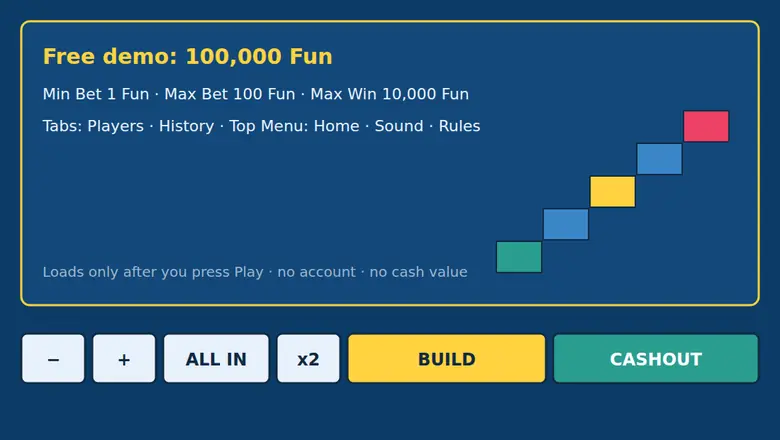
One click opens the Galaxsys demo with 100,000 Fun; the page loads nothing from the game server before that click. 18+.
01 · Demo
Tower Rush demo on this page
100,000 Fun credits, no account: press Play to load this page’s Tower Rush demo.
Click to load
The game waits for your click instead of starting automatically. Its city-street scene shows a green Wine Store as the first building and a crane hook with yellow-black stripes. This tower rush game demo uses virtual credits, not an operator balance. You can read how the Tower Rush game works for the floor-stacking format.
| Demo detail | Value |
|---|---|
| Starting balance | 100,000 Fun credits |
| Account needed | No |
| Credit cash value | None |
The tower rush demo play button loads the game without a sign-up step.
02 · Demo
Tower Rush demo limits from the Rules
The Rules set bets from 1 to 100 Fun and cap a win at 10,000 Fun.
Bet and win limits
| Rule | Demo limit or condition |
|---|---|
| Minimum bet | 1 Fun |
| Maximum bet | 100 Fun |
| Maximum win | 10,000 Fun, or 100 times the maximum bet |
| At the maximum win | The amount stops growing; another build can lose it |
The in-game Rules allow a limitless potential number of floors. The odds of every placed floor multiply together, and CASHOUT pays the bet multiplied by accumulated odds. A falling floor ends the round and loses the bet unless an amount is frozen. The maximum-win cap applies even when the next floor could raise the accumulated odds.
03 · Demo
Our Tower Rush demo test on 2 November 2026
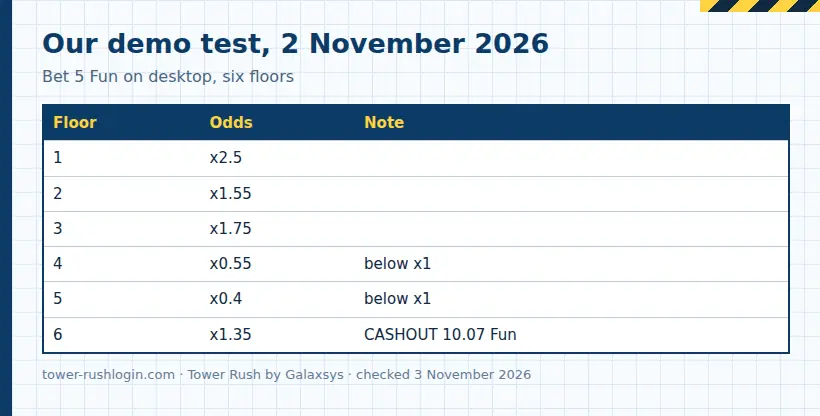
On 2 November 2026, our desktop and mobile demo rounds recorded different floor sequences.
Desktop and mobile rounds
| Test | Floor | Odds |
|---|---|---|
| Desktop | 1 | x2.5 |
| Desktop | 2 | x1.55 |
| Desktop | 3 | x1.75 |
| Desktop | 4 | x0.55 |
| Desktop | 5 | x0.4 |
| Desktop | 6 | x1.35 |
| Mobile | 1 | x1.3 |
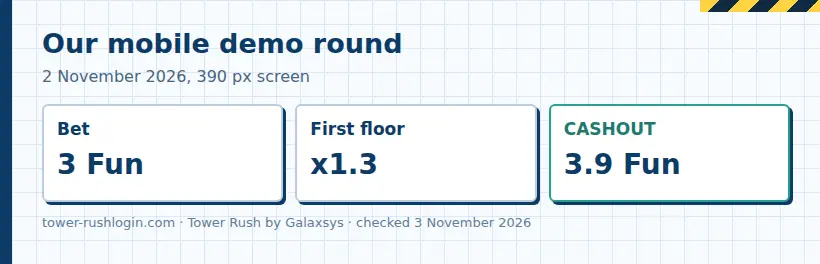
The desktop round used a 5 Fun bet, paid 10.07 Fun after CASHOUT and moved the balance from 99,995 to 100,005.07 Fun. The mobile round used a 3 Fun bet and paid 3.9 Fun after CASHOUT. These are two demo outcomes, not forecasts. The x0.55 and x0.4 floors show how a taller tower can pay less when odds fall below x1. The rules of the Tower Rush round explain how floor odds affect the payout.
04 · Demo
Demo buttons and tabs
Use BUILD to place a floor, then choose CASHOUT or BUILD to settle or continue the round.
What each control does
- Press Play to load the demo on this page.
- Use minus, plus, ALL IN or x2 to adjust the displayed bet before building.
- Select BUILD to place a floor; after placement, the game shows BUILD and CASHOUT.
- Select CASHOUT to collect the displayed amount, or BUILD to place another floor.
- Open Players, History or Top to view that demo tab; Home, Sound and Rules appear in the menu.
The controls show available actions, while the in-game Rules describe settlement. The tower game also shows accumulated odds after each placed floor.
05 · Demo
What the demo shows and cannot show
If you use Fun credits, the demo payout has no cash value and cannot become an operator withdrawal.
Demo limits as a test
The demo shows controls, floor odds and round settlement under virtual credits. It does not create a Tower Rush account: an operator holds the account, sign-up, login, deposit and identity checks. An operator may request identity documents before withdrawal. The editorial desk’s guide to operator sign-up explains the separate account step.
The published RTP figures differ: the Galaxsys game card lists 98.50%, while demo Rules show 96.17–97%. The operator’s version decides which figure applies, and its in-game Rules show that figure. Galaxsys lists provable fairness as a feature, but a short demo test does not predict later floor outcomes.
Frozen Floor freezes the accumulated amount, which remains payable if the tower later falls; each round allows one freeze. After that floor, no other bonus floors appear, and later floors have odds of at least x1.5 or collapse. Temple Floor spins a 10-section wheel and can repeat. Triple Build places three floors automatically, each with odds of at least x1, and can repeat. Bonus floors look like ordinary floors until placed; the Rules describe up to three bonus floor types.
06 · Demo
Tower Rush demo versus an operator version
The demo needs no account, while an operator holds the account used for its version of the game.
Where account and game access live
| Feature | This page’s demo | Operator version |
|---|---|---|
| Account | No account needed | The operator handles account registration and login |
| Credits and play | Fun credits have no cash value | The operator handles deposits and withdrawals |
| Access | Press Play on this page | HTML5 game in a browser or operator app |
| Checks | No demo sign-up | The operator may request identity documents before withdrawal |
| Offers | No operator offer in the demo | The operator’s promotion page shows current offers, codes and wagering terms |
Operators commonly open accounts with a mobile number or email and password; many send an SMS one-time code. Players use a Forgot password link to reset a password, must be 18 or older and must keep one account. See how to log in and open Tower Rush for the operator login flow, and how operator promo codes work in Tower Rush for offer terms. Galaxsys publishes no standalone Tower Rush app: its HTML5 game runs in a mobile browser or inside an operator’s app. The Tower Rush Android and iPhone access guide covers that distinction. “Tower Rush APK,” mod, hack and predictor files from Telegram, YouTube or file sites do not come from Galaxsys: results are random.
07 · Demo
Practice plan for fixed-floor cashouts
Choose a floor count before the round, then record the displayed odds and payout in the demo.
Repeatable demo steps
- Press Play and note the virtual balance before starting a round.
- Choose a bet within the Rules’ 1–100 Fun range and select BUILD.
- After each floor, record its odds and the displayed accumulated amount.
- Cash out at your chosen floor count, then compare the payout with your notes.
- Mark any odds below x1, because those multipliers can reduce a payout as the tower grows.
This Tower Rush demo run records game mechanics rather than a winning method: floor odds multiply, and a collapse can end the round. Readers can review ways to play the tower game within limits before choosing an operator. In India, the Promotion and Regulation of Online Gaming Act, 2025 has prohibited online money games since 1 May 2026, and demo rounds with Fun credits involve no stake.
FAQ
Demo questions
Does the Tower Rush demo need an account?
No. Press Play to load the page’s demo without an account; its Fun credits are virtual and have no cash value.
How does Tower Rush demo play work?
Press Play, choose a bet within the Rules’ 1–100 Fun range, then use BUILD to place floors and CASHOUT to collect the displayed amount.
What does the Tower Rush game demo show?
It shows floor odds, controls and round settlement with virtual credits; the demo does not show an operator’s account checks or cash withdrawal.
Can I use the Tower Rush demo game to predict a round?
No. A demo round records its own floor sequence, while Galaxsys says results are random and a short test does not predict later outcomes.
Is there a Tower Rush APK from Galaxsys?
No. Galaxsys publishes no standalone Tower Rush app; its HTML5 game runs in a mobile browser or inside an operator’s app.